Blog· Philosophy
The Design Philosophy of LensBench — Built for AI-Native Workflows
The biggest difference from other optical software is not an added chat box, but that, starting from the data model, it is designed for people and AI changing a design together.
 The LensBench TeamOct 17, 2026 · 3 min read
LensBench is a sequential lens design workbench. The biggest difference from other optical software is not an added chat box: starting from the data model, it is designed for people and AI changing a design together.
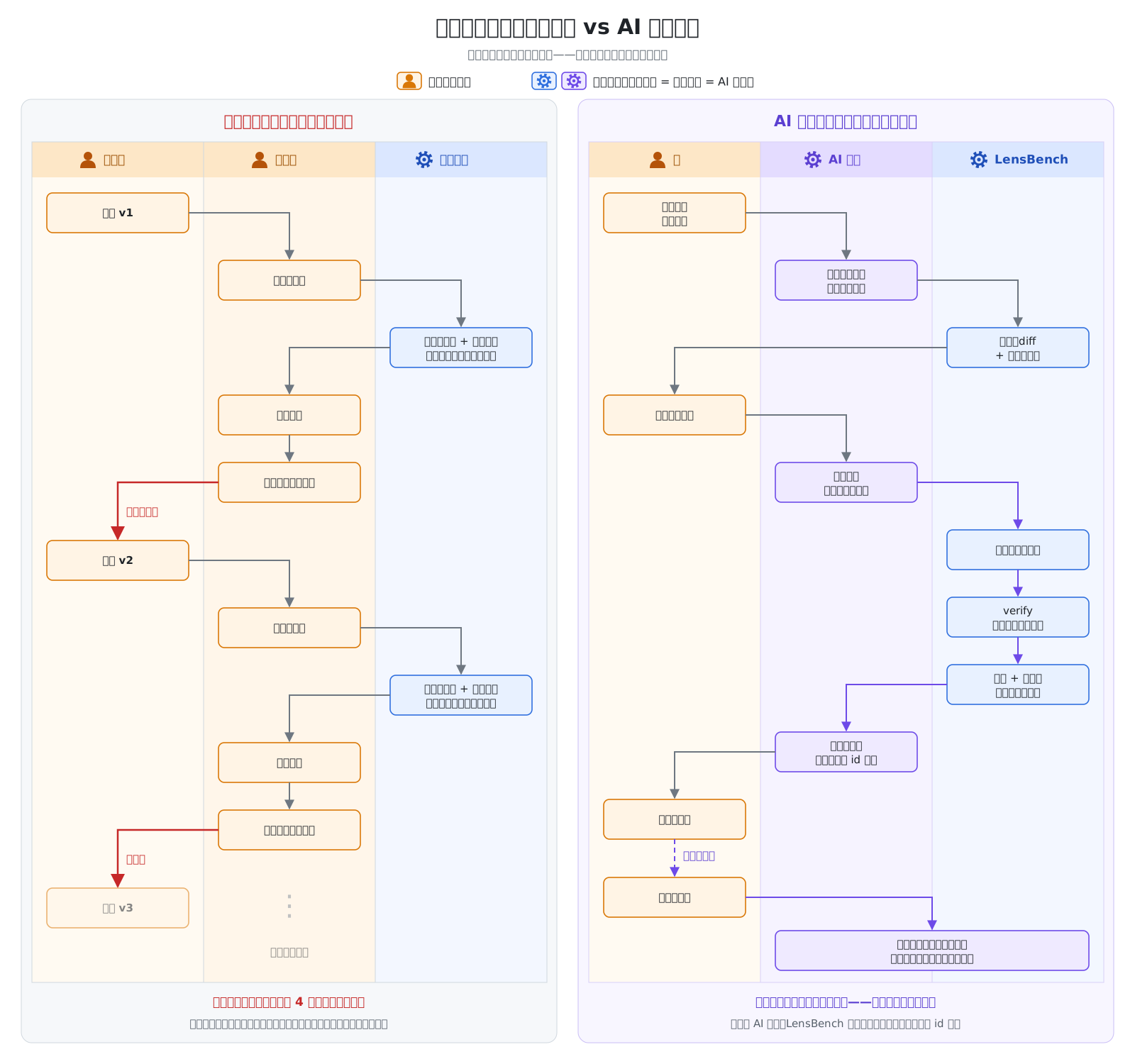
This is how we want you to work: you tell the AI "change the thickness of the last surface to a paraxial focus solve and see how much the total length changed". The AI first does a dry run and lays out the diff and the before/after focal length, back focal length, F-number and total length; it writes only when you nod; every number it reports carries an evidence id that traces back to the specific computation; and any step can be undone, with every change kept on the timeline.
Behind this are a few principles, each written up in its own post:
- A design is just text: the AI can read it and write it, and changes are naturally reviewable patches; everything speaks Zemax
- One command table: the desktop app, the command line and the AI use the same set of commands, so the AI has no hidden channel
- See the diff first, then change the design: the confirm button always stays in your hands, and changes are undoable and traceable
- Every number has a source: evidence ids and independently recomputed acceptance, never trusting "the optimizer says it got better"
- What an AI-native workflow looks like: a real conversation, and three ready-made templates for diagnose-and-optimize, Zemax reconciliation and report material
What it can do now
Design, analysis and optimization of sequential imaging systems, plus file interchange and numerical reconciliation with Zemax. Multi-configuration and tolerancing are already usable; non-sequential, stray light and physical optics propagation are not done at this stage. The desktop app ships as an installer only; see Install. For the item-by-item scope, see Capabilities and scope.
What to do in the community
- Share your AI workflow: which model you used, how you prompted it, where the AI went wrong; see Share your AI workflow
- Reconcile: post numbers that don't match Zemax to the forum's "Zemax numerical reconciliation"
- Report problems: post to "Bug reports"; ones with design files go through confidential feedback, visible only to you and the development team. The forum bot reproduces and follows up automatically
- Make suggestions: post to "Suggestions and feedback", where everyone can vote
Keep reading
- Philosophy
A Design Is Just Text — Why .lens Is the Foundation of AI-Native
The entire state of a lens is a piece of .lens text. The AI can read it and write it, and every change is a visible diff.
The LensBench TeamOct 17, 2026 · 2 min read - Philosophy
One Command Table — What the AI Can Do Is What You Can Do
The same command is, at once, an action in the desktop app, a subcommand of the command line, and a tool the AI calls. The AI has no hidden channel.
The LensBench TeamOct 17, 2026 · 2 min read - Philosophy
See the Diff First, Then Change the Design — The Confirm Button Stays in Your Hands
When you let an AI change a design, the worst fear is that it quietly changes something you didn't notice. So every change is dry-run first — which numbers changed and how the metrics move, and it is written only after you confirm.
The LensBench TeamOct 17, 2026 · 2 min read