
Orchestration: Actions and Reports
When you swap a glass, the question is never just "how much did image quality change": will the thermal defocus exceed the depth of focus, is the lens lighter or heavier, what are the new glass's chemical stability and availability, and does it still pass acceptance? Until now that meant opening analysis windows one by one in the software, running thermal analysis, looking up glass data tables, and then copying the numbers into a table by hand to compare.
Orchestration splits this into two things, both written in the .lens, carried with the design, and diffable:
- Action (
action): a change to try, such as "swap surface 3 for N-F2, then refocus". It runs on a copy of the design and does not change the current design - Report (
report): what to look at after the change and in what order, such as "optics, thermal effects, weight, materials, acceptance"
One command runs every action, evaluates each report item, and produces a before/after comparison summary:
lb report-run cooke.lens                              # baseline and all actions, side by side
lb report-run cooke.lens 换玻璃评估 --actions "无铅 全国产"
lb report-run cooke.lens --out reports/glass_study    # also writes summary.md / summary.json / the .lens of each option
lb report-run cooke.lens --save                       # writes to the default directory <lens directory>/reports/<lens name>_<report name>/
lb action-run cooke.lens 无铅 --dry-run               # pick one option: look at the patch first, then drop --dry-run to apply it
Orchestration lines are not part of the model hash: changing only the orchestration leaves every analysis number and evidence id unchanged. The AI uses action_add, report_add, and the like over MCP to change the orchestration, through the same set of commands a person uses.
In the desktop app
- The ribbon's "交付 › 编排…" (Deliver › Orchestration…) opens the orchestration window. Actions and reports can be edited in the window: "+ 评估项" (add item) adds an item to a report; drag the ⠿ at the start of a row to reorder items and steps (or click ↑ ↓), and × deletes; for items with options (optics, thermal effects, tolerancing), click "选项" (Options) to expand a form, leave blanks to use the defaults, and "应用" (Apply) changes only the corresponding options on that line (same as
lb report-set, undoable); under "编辑动作" (Edit action), write an action name and a step (such asset 3 glass=SCHOTT:N-F2) and add it. All of this only edits the text in the "报告编排" (Report orchestration) tab at the bottom (the same.lens), so editing there directly works just as well - Pick a report, tick the actions to compare, and click "运行" (Run) — evaluation happens in the background (the interface stays usable, shows "step k / N" and a progress bar, and can be cancelled), and when it finishes the window shows each option's key changes (worse ones first, in red), what was changed, and a comparison table for each evaluation item (one column per option, better in green and worse in red)
- "采用…" (Adopt…) under an option fills in
action_runon the right-hand "参数" (Parameters) tab: you see the diff and the before/after metrics first, and the change is written only when you click apply; it can be undone - Each run writes its summary to
<lens directory>/reports/<lens name>_<report name>/(summary.md, summary.json, the .lens of each option; for an unsaved design it writes to a temporary directory), the window shows the path and lets you copy it, and it also appears under "产物" (Outputs) on the right - "复制汇总" (Copy summary) puts the whole comparison (the same as the output of
lb report-run) on the clipboard, ready to paste into a report or send to the AI - The same group also has "热分析" (Thermal analysis), "镜片重量" (Lens weight), and "材料数据" (Material data), with results written on the terminal tab
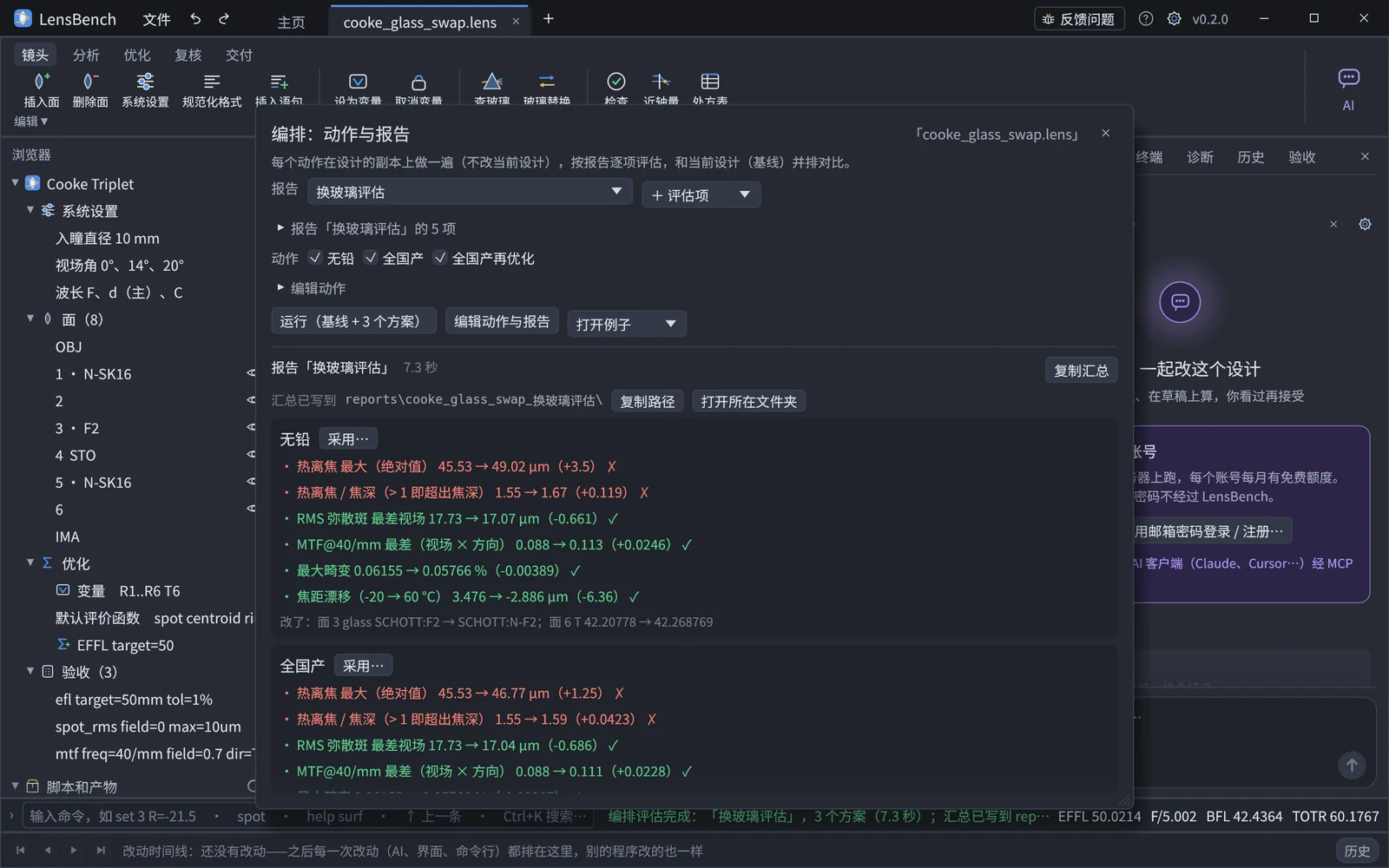
An example
The middle element of a Cooke triplet uses leaded F2. The customer wants lead-free glass, and ideally all-domestic glass:
action 无铅 set 3 glass=SCHOTT:N-F2
action 无铅 refocus
action 全国产 set 1 glass=CDGM:H-ZK9B
action 全国产 set 3 glass=CDGM:H-F4
action 全国产 set 5 glass=CDGM:H-ZK9B
action 全国产 refocus

report 换玻璃评估 optics freq=40/mm
report 换玻璃评估 thermal temp=-20C..60C housing=aluminum
report 换玻璃评估 weight
report 换玻璃评估 material
report 换玻璃评估 verify
(Here "无铅" is the lead-free action, "全国产" is the all-domestic action, and "换玻璃评估" is the glass swap study report.)
The output of lb report-run begins with each option's key changes relative to the baseline (worse ones first), followed by a comparison table for each evaluation item. The program's real output is in Chinese:
## 关键变化(相对基线)
- 无铅:热离焦 最大(绝对值) 45.53 → 49.02 µm(+3.5) ✗;热离焦 / 焦深(> 1 即超出焦深) 1.55 → 1.67(+0.119) ✗;
  RMS 弥散斑 最差视场 17.73 → 17.07 µm(-0.661) ✓;…;玻璃总质量 3.417 → 3.352 g(-0.0656,-1.9 %) ✓
- 无铅 改了:面 3 glass SCHOTT:F2 → SCHOTT:N-F2;面 6 T 42.20778 → 42.268769
In English, the first heading reads "Key changes (relative to baseline)", and the first line reads: lead-free — thermal defocus, maximum (absolute value) 45.53 → 49.02 µm (+3.5) ✗; thermal defocus / depth of focus (> 1 means beyond the depth of focus) 1.55 → 1.67 (+0.119) ✗; RMS spot, worst field 17.73 → 17.07 µm (−0.661) ✓; …; total glass mass 3.417 → 3.352 g (−0.0656, −1.9 %) ✓.
✓ means better, ✗ means worse, and * means changed with no better or worse (such as a glass name or nd); the figure in parentheses is the change relative to the baseline. Values that are the same at the displayed significant figures are not marked. The result of every evaluation item on every version of the design is registered with an evidence id, so numbers cited in a report can be checked one by one with lb check-report.
The repository's examples/studies/ has four complete examples:
| File | Question |
|---|---|
cooke_glass_swap.lens | Swapping in lead-free / domestic glass: image quality, thermal defocus, weight, materials, acceptance; the third option is re-optimized after the swap |
double_gauss_weight.lens | Weight reduction for a double Gauss: how much lighter with lower-density equivalent glasses, and whether image quality, edge thickness, or thermal defocus get worse |
telephoto_thermal.lens | A telephoto lens from −40 to +85 °C: thermal defocus compared across three barrel materials (aluminum, titanium, Invar), then trying a glass swap in the rear group |
cooke_tolerance.lens | After switching to domestic glass and re-optimizing, are the tolerances looser or tighter: sensitivity (the most sensitive items are the decenters of the middle and rear elements), Monte Carlo yield, and inverse tolerancing (how many items must be tightened to keep RMS under 12 µm) compared side by side; a second report, "默认公差" (default tolerances), adds precision-grade default tolerances and looks at sensitivity again |
Actions
action <name> <step> [parameters …], one step per line; lines with the same name are combined into one action in the order written:
| Step | Syntax | What it does |
|---|---|---|
set | set 3 glass=CDGM:H-ZF52A, set 4 T=5 R=-20 | Change parameters of a surface, same as lb set (surface numbers may also be written OBJ / STO / IMA) |
system | system "aperture FNO 4" | Replace one system setting statement, same as lb system |
refocus | refocus | Adjust the thickness just before the image plane to minimize the RMS spot (same as solve(focus), with the result written as a number); left alone if that thickness already has a solve |
optimize | optimize cycles=30 | Run one local optimization using the var / op / default in the design, same as lb optimize |
Each step is just that command itself, so the same rules apply: a step that introduces a new error is rejected, the whole action stops at that step, and the report says which step it was and why.
Reports
report <name> <item> [option=value …], one item per line; lines with the same name are combined into one report in the order written. When no report is written, the default report is used (optics, thermal effects, weight, materials, acceptance, manufacturability). The same kind of item can be written several times with different options, for example one thermal for each of three barrel materials.
| Item | What it looks at | Options |
|---|---|---|
optics | EFFL, BFL, F/#, total length; polychromatic RMS spot for each field; tangential / sagittal MTF at the same frequency; maximum distortion; maximum lateral color | freq= |
thermal thermal effects | Thermal defocus at both ends of the temperature range, maximum thermal defocus, slope (µm/°C), ratio to depth of focus; focal length drift; worst RMS and MTF over the whole temperature range with the image plane fixed | temp= steps= ref= housing= pres= freq= |
weight | Mass of each glass element, total glass mass and total volume | — |
material materials | For each glass: nd, vd, density, coefficient of linear expansion, dn/dT, ΔPgF, availability status, relative price (with an AGF), chemical stability | — |
verify acceptance | Value and pass / fail of each spec, and the number passed (same as lb verify) | — |
manufacturing manufacturability | Edge thickness of each element, mounting violations, and warnings for edges that are too thin | — |
tolerance tolerancing | Runs tolerance analysis from the tol lines in the design (same as lb tolerance, with the criterion computed after the compensators are re-optimized). Sensitivity: the nominal criterion, the root-sum-square estimate, and the largest contributors; Monte Carlo: mean, standard deviation, 50 / 90 % quantiles, worst, and, when limit is written, the yield (the distribution of values follows the design's tol stat / the line-end stat=, and when it is not the default normal ±2σ the description says so); inverse (mode=inverse, same as lb tolerance-inverse, not written back): the criterion worsens by at most change= when each item is applied alone, or stays within limit=; it reports how many items need tightening, the estimate under the inverse tolerances, and what percentage of the original tolerance the most tightened items can be put at. tols=precision (or commercial / high) adds a set of default tolerances of that grade on top of the design's tol lines (same as lb tolerance-default, added on the copy only). It is slow to compute and is not in the default report; it runs only when written out | mode= trials= seed= cycles= top= limit= change= tols= |
The whole report compares at one MTF frequency: that of the first item that has freq=, or, if none does, 1/8 of the baseline cutoff frequency (rounded to a multiple of 5).
Thermal options: temp=-20C..60C (temperature range, °C), steps=5 (number of temperature points, including both ends), ref=20C (nominal temperature, the temperature the design is at), housing=aluminum (barrel material: aluminum 23.6, steel stainless steel 17.3, brass 20.5, titanium 8.6, invar 1.3 (×10⁻⁶/K), none spacings unchanged), pres=1 (air pressure relative to 1 atm; 0 = vacuum).
How thermal analysis is computed
Thermal effects (also available on their own as lb thermal) make a copy of the design at each temperature point and evaluate it:
- Refractive index: from the vendor catalog's thermal dispersion coefficients (the Schott formula), Δn_abs = (n² − 1)/(2n)·[D0ΔT + D1ΔT² + D2ΔT³ + (E0ΔT + E1ΔT²)/(λ² − λtk²)], then converted to the index relative to air at that temperature and pressure (the refractive index of air varies with temperature and pressure, as in Zemax's environment correction)
- Elements: radii, aspheric coefficients, fixed semi-diameters, and center thickness scale uniformly with the glass's own coefficient of linear expansion (the surface form scales as a whole)
- Air spacings: spacers, barrel, and image-plane mounting all scale with the barrel material; the object distance is unchanged
- Thermal defocus: the distance of the paraxial marginal ray's image point (the same as
solve(marginal_height, 0)) from the image plane, minus the same quantity at the nominal temperature; a positive value means the focus is behind the image plane. It is compared against the depth of focus ±2λN²: a ratio greater than 1 means it exceeds the depth of focus. N is the paraxial working F/# of the cone converging onto the image (1/(2n′|u′|), u′ being the slope of the paraxial marginal ray at the image): with the object at infinity it is the image-space F/#; with a finite object it is larger than the image-space F/# (twice as large for a 1:1 singlet), and for object-space telecentric designs with the entrance pupil at infinity the image-space F/# does not apply — both are computed from the paraxial marginal ray - Image quality with the image plane fixed: RMS spot and MTF at each temperature without refocusing
The model assumes the whole lens is at a uniform temperature (no temperature gradients), and ignores stress birefringence and how the cement layers and elements are mounted. For materials whose vendor catalog has no thermal dispersion coefficients or linear expansion coefficient (model glasses, some crystals and plastics), 0 is used, and the result states which ones. The formulas have been checked against independent analytic solutions for a single lens (how far to trust the computation).
Weight and material data
- Mass (also available on its own as
lb weight): one glass element = the glass between two adjacent surfaces, with the outer diameter taken as the larger of the two semi-diameters and the surface with the smaller semi-diameter extended as a plane beyond its own semi-diameter (same as Zemax's VOLU / TMAS), and the volume multiplied by the vendor catalog's density. Only glass is counted, not barrel and spacers - Material data (also available on its own as
lb materials): taken from the vendor catalog — the bundled material library, or an AGF loaded by anagfline (its TD, ED, OD lines). Chemical stability follows each vendor's own grading, and a smaller number is better; the grading systems differ somewhat between vendors, so see the notes when comparing across vendors - Supply status and relative price have one source: the catalog the design actually takes its refractive index from. A glass resolved from an AGF (an
agffile or folder) takes the status and price from that AGF's NM / OD lines; a glass from the bundled material library takes them from the library (which has no prices). Status, price, density, thermal data and the index then all come from the same record, and the evidence registry already names that record as the material source — no guessing which catalog is newer by date. The bundled library's vendor snapshots are SCHOTT / OHARA / HOYA / HIKARI / SUMITA 2017 and CDGM 2022-06; for current supply status, load the vendor's current AGF - When the other catalog (the same grade in the bundled library, for a glass taken from an AGF) gives a different status,
lb materialsandlb checksay so (I-GLASS-STATUS-CONFLICT, the design's own source wins); obsolete glasses get W-GLASS-OBSOLETE inlb checkwith a pointer tolb glass-replace.lb glass,lb glass-mapandlb glass-substituteshow the status too - The bundled library stores the status shifted by one code (its source AGF codes 0 standard / 1 preferred / 2 obsolete were written as "none / standard / preferred" — the whole library has no "obsolete", and CDGM F4 or SCHOTT SF66 appeared as preferred); LensBench restores the AGF codes, so e.g. CDGM F4 is obsolete and H-F4 / H-ZK9B are preferred
- Relative prices are relative to each vendor's own reference glass (SCHOTT N-BK7, CDGM H-K9L, …) and cannot be compared across vendors
Output and AI
--out directorywrites three things:summary.md(same as the command output),summary.json(all the data: every version of the design, every row of every evaluation item, evidence ids, and the detail for each temperature point), andvariants/<action>.lens(the design of each option after the change, which can be opened directly to reproduce it)- To write a formal report, give
summary.jsontogether with the report pack to the AI: numbers are copied as they are, evidence ids are cited, and after writing you check withlb check-report - Tools of the same names in MCP:
report_run,action_run,action_add/action_delete/action_move,report_add/report_delete/report_move,thermal,weight,materials.report_runandaction_runcan run in the background withbackground=true - For all statements and parameters see the .lens statement reference, and for commands see the command reference